Screenshots

App details
- Version
- 5.9
- Size
- 1.86 MB
- Updated
- July 12, 2024
- Requires
- Windows 11
- Language
- English
- License
- Full
- Developer
- Drive Recovery Software
- Category
- Windows OS
SoftPas in:
This product is also available in the following languages:
About Drive Regainer Utility
Download Drive Regainer Utility – Free Windows File Recovery Tool
Overview
Drive Regainer Utility for FAT is a dedicated file‑rescue solution built specifically for Windows environments. Developed by the seasoned team at Drive Recovery Software, this utility targets FAT‑formatted storage devices—such as USB flash drives, external hard disks, and memory cards—to recover lost, deleted, or corrupted files quickly and securely. What sets Drive Regainer apart is its intuitive preview function, allowing users to browse through recoverable items before committing to the final restore. Whether you’ve accidentally emptied the recycle bin, experienced a sudden power outage, or faced a system crash that left your data inaccessible, the software offers a straightforward workflow: scan, preview, and recover to a location of your choosing. The program’s lightweight design ensures that it runs smoothly even on older machines, while its robust scanning engine maximizes the chances of retrieving fragmented or partially overwritten files. In short, Drive Regainer Utility combines powerful recovery algorithms with a user‑friendly interface, making it an essential tool for both casual home users and IT professionals who need a reliable safety net for FAT‑based media.
Core Features & Benefits
- Deep FAT Scanning Engine: Utilizes sector‑level analysis to locate lost files across FAT12, FAT16, and FAT32 partitions.
- Live Preview of Recoverable Files: View thumbnails, file names, and sizes before initiating the recovery process.
- Selective Recovery: Choose individual files or whole folders, saving only the data you truly need.
- Secure Save Locations: Direct recovered files to any folder on your computer, external drive, or network share.
- Batch Processing: Queue multiple drives for simultaneous scanning, saving time for power users.
- Lightweight & Portable: Requires minimal system resources and can be run from a USB stick without installation.
- Automatic Update Checker: Keeps the software current with the latest file‑system patches and bug fixes.
- Comprehensive Log Files: Generates detailed reports of scan results and recovery actions for audit purposes.
Beyond the raw feature list, Drive Regainer Utility delivers tangible benefits that matter in real‑world scenarios. Its deep scanning algorithm uncovers files that generic tools often miss, especially when the file allocation table is partially corrupted. The preview capability eliminates the guesswork, ensuring you don’t waste time restoring irrelevant data. For businesses handling sensitive information, the secure save‑to‑location feature means recovered files never overwrite existing directories unintentionally, preserving data integrity. The batch processing mode is a boon for technicians who need to service multiple clients in a single session, while the portable nature allows for on‑site recovery without needing administrative rights to install software. Together, these features create a balanced solution that prioritizes efficiency, safety, and ease of use.
Installation, Usage & Compatibility
Step‑by‑Step Installation
- Visit the official Drive Regainer Utility download page and click the Download for Windows button.
- Once the installer (DriveRegainerSetup.exe) finishes downloading, double‑click to launch it.
- Follow the on‑screen wizard: accept the license agreement, choose an installation folder (default is C:\Program Files\Drive Regainer), and click Install.
- After the copy process completes, click Finish to launch the application automatically.
How to Use the Tool Effectively
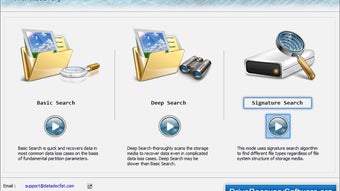
Upon opening Drive Regainer Utility, you’ll be greeted by a clean dashboard with three primary tabs: Scan, Preview, and Recover. Start by selecting the FAT‑formatted drive you wish to scan from the drop‑down menu. Choose the scan mode—Quick Scan for recently deleted files or Deep Scan for more thorough recovery. Click Start Scan and let the engine work; progress is displayed in real time.
When the scan finishes, the Preview tab populates with a sortable list of recoverable items. You can filter by file type, size, or date modified. To recover, simply tick the checkboxes next to desired files, click Recover, and browse to the destination folder where you want the files saved. The program confirms each successful restore with a green checkmark and logs any files it could not recover.
System Requirements & Operating System Support
Drive Regainer Utility is optimized for Windows 10, Windows 11, and legacy Windows 7/8 platforms (both 32‑bit and 64‑bit). Minimum hardware requirements include a 1 GHz processor, 512 MB RAM, and at least 100 MB of free disk space for the application itself. Because the software interacts directly with storage devices, administrator privileges are recommended for best performance, though the portable mode can run without installation on any Windows machine.
While the current release focuses on Windows, the development team has announced plans to expand support to macOS and Linux in future updates. For now, Windows users enjoy a seamless, native experience that leverages the OS’s low‑level disk access APIs, ensuring the deepest possible scan of FAT structures.
Pros and Cons
Advantages
- Highly accurate FAT recovery with sector‑level scanning.
- Live preview prevents unnecessary restores.
- Lightweight, portable version available.
- Batch processing saves time for technicians.
- Comprehensive logs aid in compliance and auditing.
Drawbacks
- No native support for NTFS or exFAT in the current version.
- Free version limits simultaneous scans to one drive at a time.
- Advanced recovery options (e.g., raw sector repair) require the paid upgrade.
FAQ & Conclusion
Can Drive Regainer Utility recover files from a corrupted FAT partition?
Yes. The deep scan mode analyses raw sectors and can locate files even when the FAT table is damaged, increasing the chance of successful recovery.
Is there a limit on the size of files that can be recovered?
The free edition imposes no explicit size limit; however, very large files (several gigabytes) may take longer to rebuild, and the paid version offers faster processing for such scenarios.
Do I need an internet connection to use Drive Regainer?
An internet connection is only required for downloading updates or the initial installer. The recovery process itself runs entirely offline.
Can I recover files from a read‑only or write‑protected USB drive?
Yes. The software reads the raw sectors without needing to write to the source media, so write protection does not impede recovery.
What is the difference between the free and paid versions?
The free version offers unlimited scans but limits simultaneous drive processing and excludes advanced features such as raw sector repair, priority support, and batch licensing for enterprises. The paid upgrade unlocks these capabilities and provides a commercial license.
Final Verdict & Call to Action
Drive Regainer Utility for FAT delivers a focused, reliable solution for anyone who needs to retrieve lost data from FAT‑formatted media on Windows. Its blend of deep scanning, preview functionality, and lightweight design makes it stand out among generic recovery tools. While the lack of native NTFS support may require a complementary program for broader use, the free version already offers enough power to rescue the majority of accidental deletions on USB sticks, memory cards, and external drives. If you value a secure, user‑friendly interface and want a tool that won’t tax your system resources, give Drive Regainer a try today.
Download Drive Regainer Utility now and experience hassle‑free data recovery. For businesses seeking advanced features and priority assistance, consider upgrading to the professional license to unlock the full potential of this robust FAT recovery engine.
Pros
- Accurate FAT recovery
- Live preview before restore
- Portable version available
- Batch scanning for technicians
- Detailed log files
Cons
- No NTFS/exFAT support
- Free version limited to one drive at a time
- Advanced features require paid upgrade
Guides & Tutorials
How to install Drive Regainer Utility
- Click the Download button above.
- Once redirected, accept the terms and click Install.
- Wait for the Drive Regainer Utility download to finish on your device.
How to use Drive Regainer Utility
This software is primarily used for its core features described above. Open the app after installation to explore its capabilities.
User Reviews
No reviews yet. Be the first to share your experience.
You may also like
more
Llama 2
Free-to-use large language model As the new addition to Meta’s arsenal of langua...

NotebookLM
Revolutionizing the note-taking and idea-generation process NotebookLM is an exp...

Github co pilot
AI-inspired software development and coding platform GitHub Copilot is a browser...

Google Gemma
Google’s lightweight AI models Introducing Google Gemma , a family of cutting-ed...

AI Image Enlarger
A free app for Windows, by ai-image-larger. AI Image Enlarger is a free software...

DALL E
AI-driven text-to-image transformation engine DALL·E is a free graphic and desig...